

Skip to content
Bayou Braces
Main Menu
Bayou braces logo
Bayou Braces

How Do Dental Braces Work, and How Do They Straighten Teeth?

👤 bayou 📅 February 19, 2025 🕒 2:39 am
How Do Dental Braces Work

Are you among those people who want straighter, whiter teeth? If yes, you must opt for dental braces. They can fix issues such as crooked or gapped teeth and problems with the bite. But you may be wondering how dental braces work. They continuously apply gentle pressure to move teeth slowly into the correct position over time by using different components to guide them into the right position.

The process can take months or even years, depending on the amount of movement required. Braces are not as simple as they appear. Our blog post will explain how braces work and what each component does. We will also show you how they work to straighten your teeth gradually. Let’s get started.

The Parts of Braces and Their Role

Braces consist of several components that work together to align teeth. If the brace is complex, more parts are needed. The main parts are listed below, along with their functions.

Archwire

The archwire does most of the work to move teeth. It is initially flexible but stiffens as the treatment progresses. To give a more discrete look, it is available in stainless steel or tooth-colored materials. This is how dental braces work, as the archwire provides the necessary force to reposition the teeth gradually.

Brackets

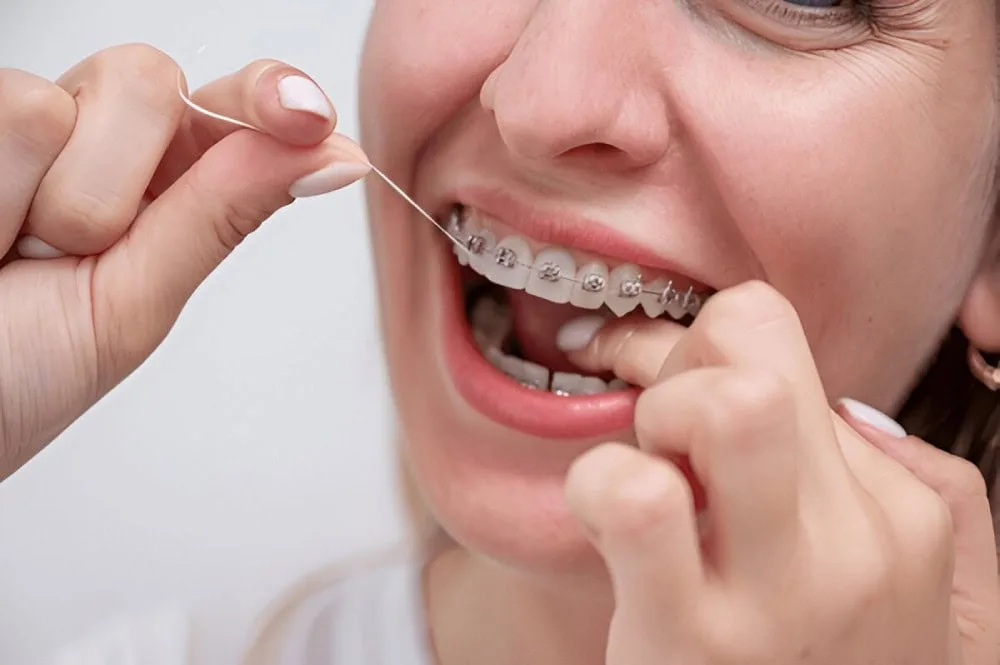
The brackets are small squares bonded to the front of every tooth. They can hold an archwire and elastic bands. The brackets are made of different materials, including ceramic, stainless steel, and plastic. For lingual braces, brackets are attached to the back of teeth.

Elastic Bands

Braces can be more effective when elastic bands are used. These rubber bands connect the upper and lower jaws and apply pressure to move teeth into the correct position. Understanding how braces move teeth with such bands is important, as they help shift the teeth into their correct alignment over time.

Metal Bands

The metal bands are placed around the teeth. They act as anchors and keep the archwire in position.

A-Chains

A-chains consist of connected elastic bands that can be attached to several brackets simultaneously. They can speed up treatment by applying extra pressure. A-chains are an example of how to make braces work faster by increasing the force exerted on the teeth.

Retainers

Retainers are worn to prevent teeth from shifting after braces have been removed. Retainers can be removable or fixed and must be worn continuously for several years to keep teeth in the new position. Maintaining a perfect smile needs the use of retainers. It is important to make sure that what do braces do by using retainers is they set the teeth in place long-term, even after treatment ends.

How Do Dental Braces Work to Move Teeth?

How do braces straighten teeth is a question that often comes to mind. Braces align teeth through gentle, constant pressure applied to the jaw and teeth. The brackets on the teeth keep the archwire in position, creating pressure that slowly moves the teeth into the correct position. This pressure gradually aligns the teeth to create a more balanced and healthy smile.

The Role of Periodontal Ligaments

The teeth are not attached directly to the jawbone. Soft tissues called periodontal ligatures hold them in place. These ligaments are like tiny shock absorbers that stretch and compress as the teeth move. The ligaments on either side of the tooth move to compress as the tooth moves to the right.

New bone is formed on the other side to fill the gap. It allows teeth to be moved safely while still keeping them in their proper place. The process of moving teeth can take time, but how long it takes for braces to start working varies for each individual.

Correcting an Overbite

Overbite occurs when the upper teeth are too close to the lower teeth. Overjet is the opposite of overbite. It refers to teeth on top that are too far forward. Both can be corrected by braces, which adjust the jaw and teeth gradually.

  • If you have an overbite problem, you can push the upper front teeth upwards, push the lower front teeth down, or raise the lower rear teeth slightly to reposition your jaw.
  • Depending on the patient’s needs, the upper teeth can be moved backwards, the lower teeth can be moved forward, or both.

How do dental braces work in this case is by applying consistent pressure to reposition the teeth into proper alignment.

Correcting Overcrowding

When the jaw is too narrow or the teeth too big to fit, overcrowding can occur. Braces make space by moving teeth backward, forward, or sideways. An orthodontist might recommend an expander for younger patients to widen their upper jaw before the bone fully fuses.

In cases where the palate is already fused, small pins may be required to aid the expansion or, in some cases, oral surgery. When overcrowding is severe, do braces move your teeth every day? The pressure is constant and will shift teeth daily, even if the changes are impossible. Your orthodontist can discuss all the options available to you to determine what is best for you.

Moving Teeth Forward

Braces can be used to pull teeth forward if necessary. Special archwires made from nickel and titanium have built-in memory. They naturally want to return to their U-shape. This wire gradually returns to its initial shape after being bent to fit the bracket.

It gently pulls the tooth forward while it does so. It creates a well-aligned, balanced smile. If you are thinking, why is my braces thing up or down? It can be due to the shifting of these wires as the teeth gradually move into place.

Can You Shorten Braces Treatment Time?

Yes! By carefully following the instructions of your orthodontist, you can speed up your treatment. It is important to avoid breakages because they can impede progress. Schedule an appointment as soon as possible to have it repaired. Even a slight delay can ruin weeks of hard work. Also, there are methods to how to make braces work faster, such as using special devices or adjusting the force applied.

Certain orthodontic techniques and tools can also reduce treatment times. Springs, implants, or small titanium pins can move the jaw more effectively. Headgear, elastic bands, and brackets work together to move teeth and jaws faster. Sticking to your treatment plan can help you achieve a perfect smile faster.

Why Choose Bayou Braces?

Are you ready to get rid of crooked teeth and get a straight smile?

At Bayou Braces, we are here to make it happen. We try our best to help you get the desired results, whether braces or clear aligners. We offer personalized care that is comfortable and effective so you can enjoy the process of getting your dream smile. Don’t wait any longer; reach out today and let us guide you to the perfect smile.

(225) 926-4133

Get started today

New Smiles Are Welcome

The first step to your new smile is to request an appointment with our amazing doctors and team! We can’t wait to chat about your unique treatment plan that will be customized to your specific needs. Let’s get started!

Free Ortho Consult
Pediatric Dentistry Appt
patient Reviews

Our 5-Star Experience

We don’t like to brag, so we’ll let some of our patients do it for us! Over the years, our team has helped many patients create amazing smiles and healthy mouths beyond their wildest dreams.

Excellent place to improve your teeth and have a beautiful smile. The service is friendly and very professional. 10/10.
Lorena R.
Lorena R.
21:45 12 Feb 26
I went to the one in Baton rouge off of Perkins Rd. The whole atmosphere was very welcoming and warm . They were friendly & kind , quick and fast with the whole process. Kandy was awesome... 😊 . She answered all my questions & went step by step through the whole process. The process wasn’t too bad, and the payment plan is super helpful. Definitely would recommend !read more
Kiera W.
Kiera W.
17:53 12 Feb 26
Kamie is a wonderful person. She is very knowledgeable and professional in her work at Bayou Braces. Loved my experience at Bayou Braces
Brittany G.
Brittany G.
18:35 29 Jan 26
Bayou Braces is the best. Jayla (the Westbank location) was so gentle, I barely felt her working in my mouth. Dr. Rich has the most amazing team.
Tiara Washington K.
Tiara Washington K.
15:14 22 Dec 25
Great customer, always making me and my child feel welcomed
Gerard M.
Gerard M.
04:43 19 Nov 25
I love the patience and care everyone has for my son when he goes in .
Chrissy P.
Chrissy P.
15:11 21 Aug 25
Charleen and Barrynee were amazing and very helpful. We got braces the same day as our consult. Great service.
Chantelle N.
Chantelle N.
14:52 06 Jun 25
I’ve been a patient for six months. My visits are always pleasant, in and out, the staff is very friendly.
Patrice P.
Patrice P.
01:59 07 May 25
The staff at Bayou Braces Laplace store is awesome! They make you feel so comfortable and welcomed. Dr. Breaux. His family, and start sets the tone for the atmosphere. I was not planning on... getting the service until receiving the amazing customer service for Dr. Breaux. He is phenomenal with clients. This site is highly recommended.read more
Omarion D.
Omarion D.
03:52 24 Mar 25
Brought both my kids into the Laplace location this morning everyone in there was very nice patient
Jennifer J.
Jennifer J.
00:22 25 Feb 25
‹
›
js_loader

344+ Reviews

4.5 Average Rating

 Rated 4.5 out of 5
more awesome reviews
Free Ortho Consult
Pediatric Dentistry Appt

We’d Love to Meet You

Thank you for visiting us online! Now it’s time to meet in person! Our team of amazing professionals are proud to offer you and your family with excellent care in the Baton Rouge, New Iberia, Lafayette and New Orleans areas of Louisiana.

Call or text

  • (225) 926-4133

Hours

  • Monday - Friday / 8 am - 5 pm
Our locations

Locations

  • Baton Rouge
  • 8482 Perkins Rd.
    Baton Rouge, LA 70810
  • New Iberia
  • 603 Rue de Lion
    New Iberia, LA 70563
  • New Orleans West Bank
  • 2800 Manhattan Blvd. Suite D
    Harvey, LA 70058
  • New Orleans East
  • 10980 I-10 Service Rd.
    New Orleans, LA 70128
  • Lafayette
  • 3259 Ambassador Caffery
    Lafayette, LA 70506
  • Alexandria
  • 4011 Lakeside Dr. Alexandria,
    LA 71302
  • Laplace
  • 170 Belle Terre Blvd. #160
    Laplace, LA 70068
Follow Us
aao
ada
invisalign

© Copyright 2026 Bayou Braces | Sitemap | Privacy Policy | Terms & conditions | Accessibility

Accessibility
Accessibility modes
Epilepsy Safe Mode
Dampens color and removes blinks
This mode enables people with epilepsy to use the website safely by eliminating the risk of seizures that result from flashing or blinking animations and risky color combinations.
Visually Impaired Mode
Improves website's visuals
This mode adjusts the website for the convenience of users with visual impairments such as Degrading Eyesight, Tunnel Vision, Cataract, Glaucoma, and others.
Cognitive Disability Mode
Helps to focus on specific content
This mode provides different assistive options to help users with cognitive impairments such as Dyslexia, Autism, CVA, and others, to focus on the essential elements of the website more easily.
ADHD Friendly Mode
Reduces distractions and improve focus
This mode helps users with ADHD and Neurodevelopmental disorders to read, browse, and focus on the main website elements more easily while significantly reducing distractions.
Blindness Mode
Allows using the site with your screen-reader
This mode configures the website to be compatible with screen-readers such as JAWS, NVDA, VoiceOver, and TalkBack. A screen-reader is software for blind users that is installed on a computer and smartphone, and websites must be compatible with it.
Online Dictionary
    Readable Experience
    Content Scaling
    Default
    Text Magnifier
    Readable Font
    Dyslexia Friendly
    Highlight Titles
    Highlight Links
    Font Sizing
    Default
    Line Height
    Default
    Letter Spacing
    Default
    Left Aligned
    Center Aligned
    Right Aligned
    Visually Pleasing Experience
    Dark Contrast
    Light Contrast
    Monochrome
    High Contrast
    High Saturation
    Low Saturation
    Adjust Text Colors
    Adjust Title Colors
    Adjust Background Colors
    Easy Orientation
    Mute Sounds
    Hide Images
    Hide Emoji
    Reading Guide
    Stop Animations
    Reading Mask
    Highlight Hover
    Highlight Focus
    Big Dark Cursor
    Big Light Cursor
    Cognitive Reading
    Virtual Keyboard
    Navigation Keys
    Voice Navigation

    Bayou Braces

    Accessibility Statement

    • bayoubraces.com
    • May 7, 2026

    Compliance status

    We firmly believe that the internet should be available and accessible to anyone, and are committed to providing a website that is accessible to the widest possible audience, regardless of circumstance and ability.

    To fulfill this, we aim to adhere as strictly as possible to the World Wide Web Consortium’s (W3C) Web Content Accessibility Guidelines 2.1 (WCAG 2.1) at the AA level. These guidelines explain how to make web content accessible to people with a wide array of disabilities. Complying with those guidelines helps us ensure that the website is accessible to all people: blind people, people with motor impairments, visual impairment, cognitive disabilities, and more.

    This website utilizes various technologies that are meant to make it as accessible as possible at all times. We utilize an accessibility interface that allows persons with specific disabilities to adjust the website’s UI (user interface) and design it to their personal needs.

    Additionally, the website utilizes an AI-based application that runs in the background and optimizes its accessibility level constantly. This application remediates the website’s HTML, adapts Its functionality and behavior for screen-readers used by the blind users, and for keyboard functions used by individuals with motor impairments.

    If you’ve found a malfunction or have ideas for improvement, we’ll be happy to hear from you. You can reach out to the website’s operators by using the following email

    Screen-reader and keyboard navigation

    Our website implements the ARIA attributes (Accessible Rich Internet Applications) technique, alongside various different behavioral changes, to ensure blind users visiting with screen-readers are able to read, comprehend, and enjoy the website’s functions. As soon as a user with a screen-reader enters your site, they immediately receive a prompt to enter the Screen-Reader Profile so they can browse and operate your site effectively. Here’s how our website covers some of the most important screen-reader requirements, alongside console screenshots of code examples:

    1. Screen-reader optimization: we run a background process that learns the website’s components from top to bottom, to ensure ongoing compliance even when updating the website. In this process, we provide screen-readers with meaningful data using the ARIA set of attributes. For example, we provide accurate form labels; descriptions for actionable icons (social media icons, search icons, cart icons, etc.); validation guidance for form inputs; element roles such as buttons, menus, modal dialogues (popups), and others. Additionally, the background process scans all the website’s images and provides an accurate and meaningful image-object-recognition-based description as an ALT (alternate text) tag for images that are not described. It will also extract texts that are embedded within the image, using an OCR (optical character recognition) technology. To turn on screen-reader adjustments at any time, users need only to press the Alt+1 keyboard combination. Screen-reader users also get automatic announcements to turn the Screen-reader mode on as soon as they enter the website.

      These adjustments are compatible with all popular screen readers, including JAWS and NVDA.

    2. Keyboard navigation optimization: The background process also adjusts the website’s HTML, and adds various behaviors using JavaScript code to make the website operable by the keyboard. This includes the ability to navigate the website using the Tab and Shift+Tab keys, operate dropdowns with the arrow keys, close them with Esc, trigger buttons and links using the Enter key, navigate between radio and checkbox elements using the arrow keys, and fill them in with the Spacebar or Enter key.Additionally, keyboard users will find quick-navigation and content-skip menus, available at any time by clicking Alt+1, or as the first elements of the site while navigating with the keyboard. The background process also handles triggered popups by moving the keyboard focus towards them as soon as they appear, and not allow the focus drift outside it.

      Users can also use shortcuts such as “M” (menus), “H” (headings), “F” (forms), “B” (buttons), and “G” (graphics) to jump to specific elements.

    Disability profiles supported in our website

    • Epilepsy Safe Mode: this profile enables people with epilepsy to use the website safely by eliminating the risk of seizures that result from flashing or blinking animations and risky color combinations.
    • Visually Impaired Mode: this mode adjusts the website for the convenience of users with visual impairments such as Degrading Eyesight, Tunnel Vision, Cataract, Glaucoma, and others.
    • Cognitive Disability Mode: this mode provides different assistive options to help users with cognitive impairments such as Dyslexia, Autism, CVA, and others, to focus on the essential elements of the website more easily.
    • ADHD Friendly Mode: this mode helps users with ADHD and Neurodevelopmental disorders to read, browse, and focus on the main website elements more easily while significantly reducing distractions.
    • Blindness Mode: this mode configures the website to be compatible with screen-readers such as JAWS, NVDA, VoiceOver, and TalkBack. A screen-reader is software for blind users that is installed on a computer and smartphone, and websites must be compatible with it.
    • Keyboard Navigation Profile (Motor-Impaired): this profile enables motor-impaired persons to operate the website using the keyboard Tab, Shift+Tab, and the Enter keys. Users can also use shortcuts such as “M” (menus), “H” (headings), “F” (forms), “B” (buttons), and “G” (graphics) to jump to specific elements.

    Additional UI, design, and readability adjustments

    1. Font adjustments – users, can increase and decrease its size, change its family (type), adjust the spacing, alignment, line height, and more.
    2. Color adjustments – users can select various color contrast profiles such as light, dark, inverted, and monochrome. Additionally, users can swap color schemes of titles, texts, and backgrounds, with over seven different coloring options.
    3. Animations – person with epilepsy can stop all running animations with the click of a button. Animations controlled by the interface include videos, GIFs, and CSS flashing transitions.
    4. Content highlighting – users can choose to emphasize important elements such as links and titles. They can also choose to highlight focused or hovered elements only.
    5. Audio muting – users with hearing devices may experience headaches or other issues due to automatic audio playing. This option lets users mute the entire website instantly.
    6. Cognitive disorders – we utilize a search engine that is linked to Wikipedia and Wiktionary, allowing people with cognitive disorders to decipher meanings of phrases, initials, slang, and others.
    7. Additional functions – we provide users the option to change cursor color and size, use a printing mode, enable a virtual keyboard, and many other functions.

    Browser and assistive technology compatibility

    We aim to support the widest array of browsers and assistive technologies as possible, so our users can choose the best fitting tools for them, with as few limitations as possible. Therefore, we have worked very hard to be able to support all major systems that comprise over 95% of the user market share including Google Chrome, Mozilla Firefox, Apple Safari, Opera and Microsoft Edge, JAWS and NVDA (screen readers).

    Notes, comments, and feedback

    Despite our very best efforts to allow anybody to adjust the website to their needs. There may still be pages or sections that are not fully accessible, are in the process of becoming accessible, or are lacking an adequate technological solution to make them accessible. Still, we are continually improving our accessibility, adding, updating and improving its options and features, and developing and adopting new technologies. All this is meant to reach the optimal level of accessibility, following technological advancements. For any assistance, please reach out to